
Now with Clear Verify, you can access verification reports, send verification requests, view your data, and more from wherever you are! Keep reading to learn more about what Clear Verify mobile has to offer.
Features:
- Home: Verification Inbox
- My Data
- Send Verification Reports
- Additional Screens/Functions Available
To access the Clear Verify dashboard, use the ‘≡’ icon in the top right corner of your mobile screen.
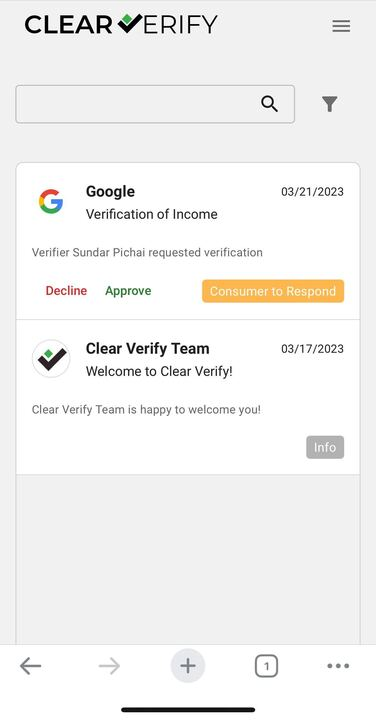
Home: Verification Inbox
Access the full functionality of your verification inbox from your mobile device by navigating to the Home page.
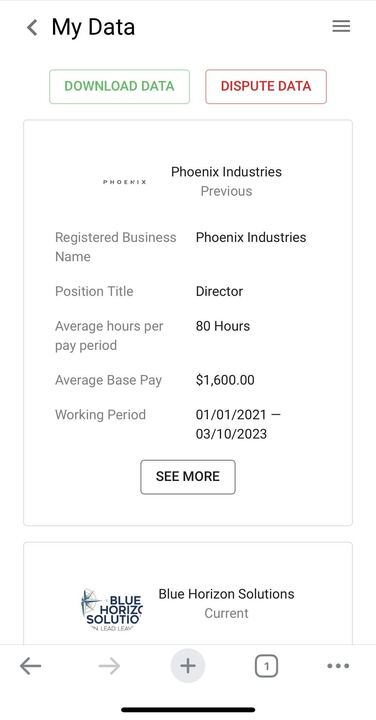
My Data
Access, download, and dispute your data directly from your mobile device using the My Data tab.
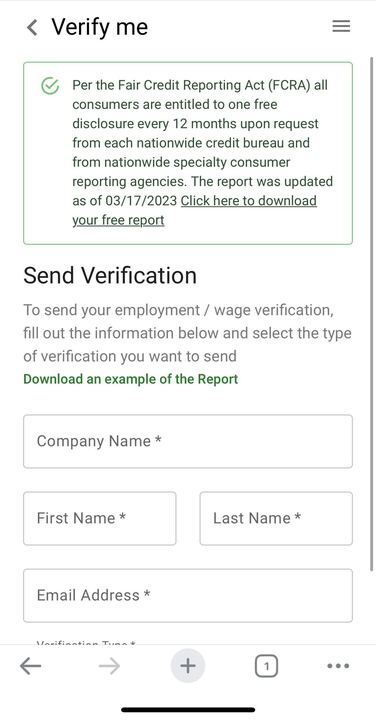
Send Verification Reports
Send verification reports to verifiers or download your annual free report directly from your mobile device using the My Verify tab.
Additional Screens/Functions Available
- Sign-up / Sign-in
- My Account (Personal Information, Privacy Settings, Notifications, Multi-factor authentication, Sign-In & Security)
- Reports
- & More!
Need more help?